The Clicks Communicator Is a Love Letter to Everyone Who Still Thinks Glass Keyboards Were a Mistake
Clicks' first standalone smartphone doesn't just bolt a keyboard onto an existing device. It argues, persuasively, that the entire form factor was never finished.
There's a particular kind of muscle memory that smartphone users over a certain age carry around like phantom limb pain — the satisfying, tactile certainty of knowing, without looking, that you hit the right key. Glass killed it. Clicks wants to resurrect it.
The company made its name with clip-on keyboard cases for iPhone, small accessories that quietly built a cult following among people who never quite made peace with typing on a slab of glass. At CES 2026, Clicks announced something far more ambitious: the Clicks Communicator, a full standalone smartphone built from the ground up around a physical QWERTY keyboard. Not a case. Not an accessory. A phone.
It's a bold move, and the timing is more interesting than it first appears. The physical keyboard didn't fade away so much as get abandoned. Around the middle of the last decade, the industry decided the bezel-to-bezel touchscreen was the future and everything else was a relic. For nearly ten years, nobody serious built a phone for the people who never agreed. The Communicator is the first credible attempt in a long time, and it treats the keyboard not as nostalgia but as an unfinished idea worth completing.
Clicks Communicator — Official CES 2026 Reveal
The Keyboard Is the Product
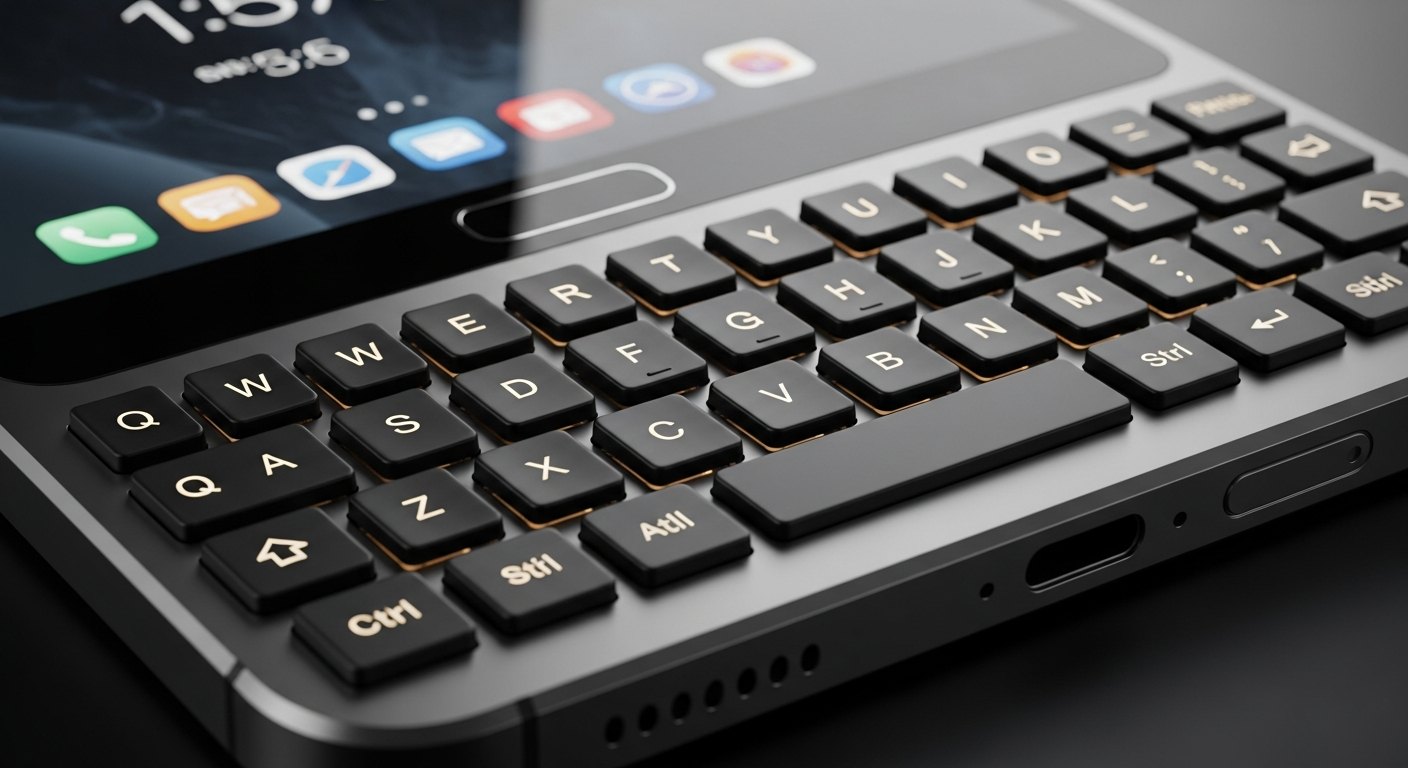
Everything else about the Communicator's design flows from one decision: put a full tactile keyboard below a 5.5-inch OLED display and don't apologize for it. That single choice dictates the proportions, the weight distribution, and the entire personality of the device. This is a candy-bar phone in the classic sense — a shape that had all but vanished from store shelves — and Clicks leans into it rather than hiding it.
The keys themselves are the star. They have genuine travel — not the shallow, optimistic travel of a MacBook butterfly switch, but actual, deliberate, satisfying travel. Each press lands with a defined bottom-out and a clean release, the kind of feedback your thumbs register without any conscious thought. The backlighting is even and well-calibrated, remaining legible in direct sunlight without bleaching out in a dark room. These are the details that separate a serious keyboard from a gimmick, and Clicks clearly sweated them.
After twenty minutes with the device, the autocorrect-induced typo starts to feel like an artifact of a different era. You type what you mean. The phone does what you typed. There's a clarity to the interaction that glass keyboards have never replicated, and after a decade of trying, probably never will. The absence of a software keyboard also frees up the entire display — no more watching half your screen vanish the moment you tap a text field.
There's an adjustment period, to be fair. If you've spent ten years thumbing at glass, the first hour feels slower, not faster. But the payoff arrives quickly, and for anyone who writes more than a sentence or two at a time — emails, long messages, notes — the ceiling is noticeably higher than what a touchscreen allows.
“You type what you mean. The phone does what you typed. Glass keyboards never replicated that, and after a decade of trying, probably never will.”
The Internals Are Honest About What This Phone Is
A Snapdragon 7+ Gen 3 with 8GB of RAM sits at the center — not flagship territory, but not a compromise either. This is a chip that handles everything a productivity-focused user will throw at it without burning through the 4,500mAh battery before dinner. In our brief time with the device, performance felt fluid and unhurried, with no stutter in navigation or app switching. The thermal story will need more testing over longer sessions, but first impressions are positive.
That choice tells you exactly who Clicks built this for. A flagship processor would have raised the price and the heat without improving the experience of writing, reading, and managing a busy inbox. Clicks optimized for endurance and consistency over benchmark bragging rights — a phone designed to disappear into your day, not top a spec-sheet leaderboard.
The camera system — a 64MP main sensor paired with a 12MP ultrawide — is competent and clearly secondary. Social media snapshots will look fine. Computational photography enthusiasts will buy a different phone. Clicks seems entirely at peace with this, and honestly, so should you be.
- Processor
- Snapdragon 7+ Gen 3
- RAM
- 8GB
- Display
- 5.5-inch OLED
- Battery
- 4,500mAh
- Main Camera
- 64MP + 12MP ultrawide
- Keyboard
- Physical QWERTY with backlighting
Android 15 With a Keyboard-First Launcher
The software layer is where Clicks has done its most interesting work. The custom launcher built on top of Android 15 exposes keyboard shortcuts throughout the OS in a way that stock Android has never bothered to. Type a letter from the home screen to jump to an app. Trigger actions, searches, and commands without lifting a thumb to the display. This is the phone for someone who thinks reaching for the screen to dismiss a notification is a design failure.
It's a small philosophical statement with big practical consequences. A physical keyboard is only as good as the software that takes advantage of it, and plenty of past keyboard phones fell down precisely here — bolting hardware onto an OS that ignored it. Clicks has instead treated the keyboard as a first-class input method, weaving shortcuts into the everyday flow of the operating system. If that idea resonated with you, the Communicator may be exactly what you've been waiting for.
The open question is longevity — how gracefully the launcher handles the parts of Android that still assume touch is king. Only months of use will tell. But as a statement of intent, the software is the most encouraging part of the package.
Who It's For
The Communicator is not a phone for everyone, and it isn't trying to be. It's aimed at a specific, underserved buyer: the heavy typist, the inbox warrior, the former BlackBerry loyalist who has spent a decade grudgingly poking at glass and never stopped missing the click. It's for the person who values input speed and accuracy over the last few percent of camera quality.
There's also a quieter accessibility angle. Tactile keys can be dramatically easier to use for people who struggle with the flat, featureless surface of a touchscreen — a group the mainstream industry has largely forgotten. For those users, a well-built physical keyboard isn't a novelty; it's a meaningful improvement in daily usability.
Pricing and Availability
The base Communicator starts at $599 — competitive for the hardware on offer, and significantly less than the flagship tax you'd pay elsewhere. That's a sharp price for a niche, purpose-built device, and it lowers the barrier for curious buyers. The Power Keyboard accessory, which extends the input experience further, runs $80–$110 and is sold separately.
- Base Price
- $599
- Power Keyboard
- $80–$110 (separate)
- OS
- Android 15 (keyboard-first launcher)
- Form Factor
- Candy bar with physical QWERTY
The Clicks Communicator doesn't try to out-camera or out-benchmark its competition. It bets, instead, that a meaningful slice of the market never stopped wanting to type well — and that nobody has seriously tried to serve them in a decade. That's a compelling bet, and the most refreshing thing about the Communicator is that it's a phone with a clear point of view in a category that too often blurs into sameness. Whether the market rewards that conviction only time will settle. But as a hands-on first impression, this is the most interesting thing to happen to the humble keyboard in years — and a reminder that the smartphone's final shape may not be as settled as we've been told.
- Apple Watch Ultra 4 Review Roundup: Same $799, Same Body, a Very Different Watch Underneath
- Google Is About to Replace the Chromebook — Everything We Know About the Googlebook
- Apple Now Wants to Lease You an iPhone — Here's What That Really Means
- Google Just Leaked Its Own Pixel 11 Lineup on Amazon — And the Prices Went Up